Another Space Game Prototype
May 13th, 2023
I have finally found some time off of school and decided to jump back into game dev! With previous projects, I often find myself falling victim to scope creep, especially when I start thinking about the visuals of the game. I wanted to change that this time around. So for the programming portion of this project, I went with a fairly simple "Bullet Hell" style of game. For these games, you will be attacked by hordes of enemies and projectiles that you must be able to navigate while fighting back to earn points. The code for this is fairly straightforward, and the skeleten is mostly complete in this clip. I will then be able to focus on shaders and 3D models for this project, which is a skillset I currently lack. This clip is already demonstrating 2 shaders, the grid in the background, and the rim glow around the dropped objects. Moving forward I will be starting to flesh out the ships, making them a little more interesting than just triangles, and making the map more interesting by adding planets, gas clouds, and other debris.
Full Fire Sim Prototype
July 22nd, 2022
Finally the full prototype! I've created a few 3D models for the aesthetic. In the prototype, I've created 3 different fuel types to test having fire spread differently on each. Fire spread from trees take the longest, grass the fastest, and bushes somewhere in between. Three different firefighting methods have also been added. The three are firelines, water drops, and retardant drops. When using theses tools, the player starts by first clicking on what tool they want to use. They then then click a start and end point, and the resulting path gets shown on the screen by the purple cuboid (which is for demonstration purposes). If the player uses a fireline, all of the fuel in that path is torn up and removed. When using water drops, any burning object within the path gets extinguished temporarily. This must be used on top of already burning objects. Finally with the retardant drop, any "flammable" objects in the path have its "ignition chance" reduced by some amount permanently. This has to be placed on objects not already burning, as reducing the "ignition chance" on something already burning does nothing. *Note that the UI shown in the video has not been implemented.
Ignition Chance Indicator
July 17th, 2022
Today I was thinking that it might be useful for the player to have a visual indicator of the percent chance of an object to start burning. Taking inspiration from the visual indicator I made for myself for testing, I decided to do something similar for the player. The player can click on an object and a raycast is sent from the mouse and to detect which object is clicked. The "ignition chance" stored within this object is then used to get a color value from a gradient, which is then displayed to the player through the UI. If a player clicks on an object that is already burning, a flame is displayed to them.
Fire Spread Improvements
July 16th, 2022
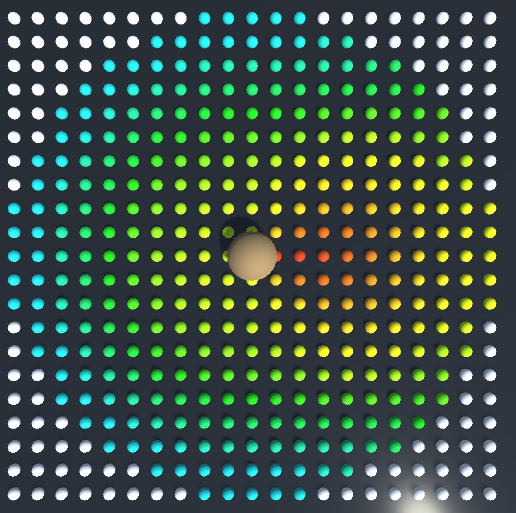
The previous fire spreading was very basic. If something was within the "ignition sphere" of a "burning" object, then there was a 100% chance it would start burning but I wanted to add a few different variables. I added humidity, fuel type, range, and wind. However to fine tune these variables when random probability is involved, I need a better method than watching the fire spread a bunch of times until I find something that appears to be right. I came up with a grid of objects that would change color based off of the percent likelihood that it will burn on the next fire spread tick with red being very likely, and blue being very unlikely. In the image, the 2 variables being visualized are wind and range.
Wildfire Firefighting Prototype - Basic Fire Spread
July 7th, 2022
Taking inspiration from my recent internship, I have started working on a prototype of another coding project! I've decided to make a very basic wildfire firefighting sim. The first thing to do of course is make the fire spread. This was fairly simple. One object starts on fire and is marked as "burning" with an internal variable. Then any other object with a "flammable" tag within an "ignition sphere" of the burning objects ends up burning themselves and the cycle repeats. In this version, there is only a placeholder fire particle system and objects burn indefinitely while I fine tune the fire spread code.
Making a Scaled Solar System
Jan 1st, 2022
Constructing a whole solar system in a game engine isnt very realistic. With the Unity Game Engine, once you get very far away from the origin jittering issues will start appearing due to floating point precision. This means that there will need to be some clever solutions to give the illusion of a very large solar system without actually having it. I was trying to solve that here and took inspiration from "Kerbal Space Program" and their solution to this. First, I keep everything limited to right near the origin. As soon as the player moves a certain distance away from the origin, they get moved back to it and everything around the player is then shifted by that offset to make it appear seamless to the player. You can see this happening on the left side of the video with the camera object occasionally jumping back to the origin. The right side of the video shows how it is invisible to the player. Now even with everything being focused around the origin, objects very far away from the player may still appear to jitter if they are paying attention. So to solve this, I have created a "scaled" solar system alongside the "real" solar system. This system is, as it sounds, scaled both in distnce and object size, and does not interact with the real system or the player at all. This scaled solar system has its own camera that follows along with the "real" players position, but again scaled, and that camera view is displayed in the background of the players true view. Since we decreased the size of objects in the solar system, this allows things to be moved much closer and still appear to be at the same distance. Finally, when the player moves within some distance of an object to the point where they need to interact with it, that object in the scaled solar system is hidden and a real, much larger version of the object is rendered in front of the player to interact with. This is demonstrated near the end of the video on the left side when the planet pops in and out of view. From the player perspective (the right), this transition is seamless (except for the lighting, which at this point has not been adjusted to match between the 2 systems yet).
Planetary Gravity
Dec 22nd, 2021
With my interest in space I wanted to try coding some space related things! Here I am playing around with simulating gravity on a spherical object for a player controller. It's hard to see in the video, but the force the 1st person player feels towards the object is dependant on the distance to the center of the sphere, just as gravity is supposed to work! Interestingly during testing, I accidentally set the speed of the player too fast, which caused it fly of the side and go into orbit (although unstable) similar to "Newtons Cannonball".